What is Bot Crossing?
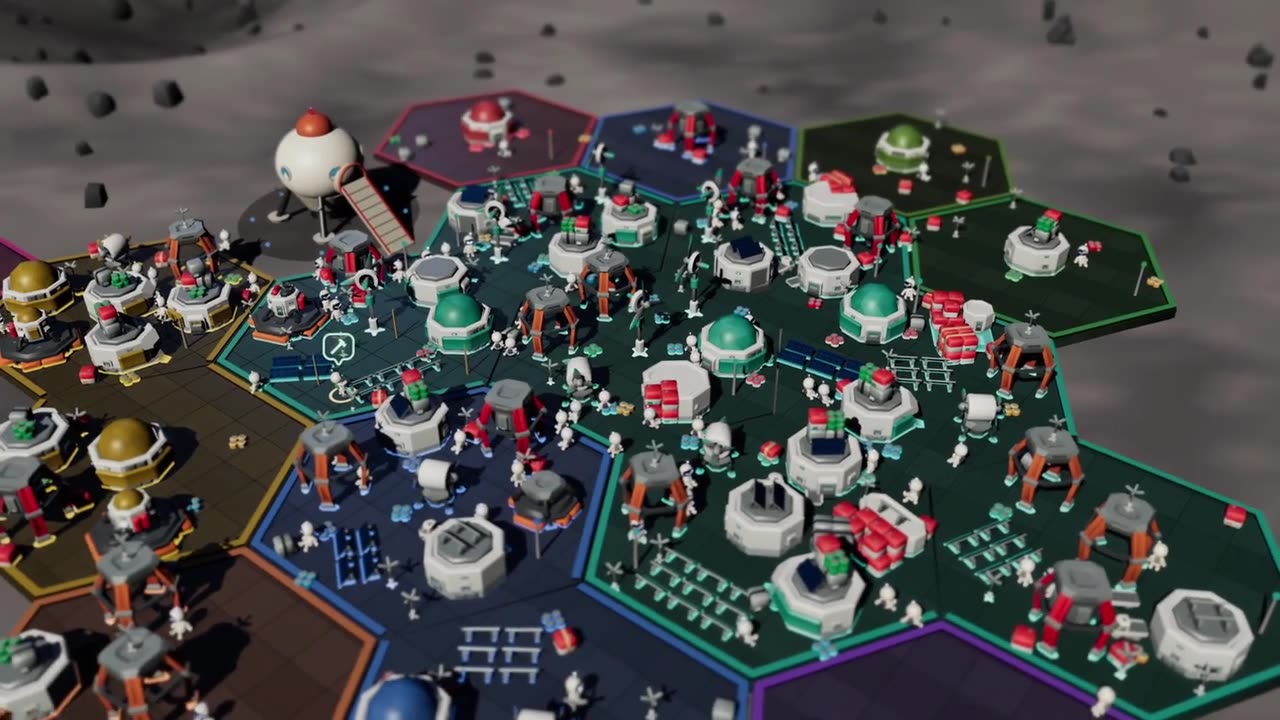
Bot Crossing turns your coding agents into a little space colony. Every session shows up as an astronaut who claims a hex plot and starts building on it. Run it yourself from GitHub and it stays entirely on your machine with no account. Or create a planet above and the page reads your sessions straight from your browser, so there is nothing to install and only titles and status are kept.
See it in action
How Bot Crossing works
Your coding agent already writes session files to disk. Bot Crossing just reads them. Every thread becomes an astronaut, every repo becomes its own neighborhood, and the work in progress shows up as construction. It all stays on your machine, and it never writes anything back to your agent.
-
Keep working the way you already do
You don't have to change anything or set anything up. Bot Crossing watches from the side and leaves you alone.
-
Each thread gets its own astronaut
The astronaut grabs a hex plot and starts building. Repos keep their spot on the map, so what you learn today is still true tomorrow.
-
A "?" means it's stuck
When an agent needs your input, the little robot raises its hand and a question badge appears over its head. Click it to jump straight into that session.
-
Fly around
Drag to pan, rotate, tilt, zoom. There are three worlds: Luna, Mars, Terra, and more coming soon, each with its own day/night cycle.
How do I install Bot Crossing?
Clone the repo and run npm install && npm run dev. That one command
brings up the API and the front end together through Vite, bound to 127.0.0.1
so it only ever answers its own page.
git clone https://github.com/Station-Sciences/bot-crossing
cd bot-crossing
npm install && npm run dev
Needs Node 22.13 or newer. For a real build, npm start builds and serves it, or npm run serve if you've already got a dist/.
It runs on macOS, Linux, and Windows. Opening a thread goes through a
harness:// deep link handed to the OS opener. On Linux, where the desktop
app often isn't installed, it checks the scheme first and opens a terminal running the
harness's own CLI when nothing answers it.
Which AI coding agents are supported?
Claude Code, Codex, and Cursor today. OpenCode, Amp, Aider, Goose, Qwen Code, Amazon Q
Developer CLI, and Google's Antigravity CLI aren't wired up yet. Adding one is small
though. It's an adapter file in server/harnesses/ and a line in the registry,
so if you want yours in here, that pull request is very welcome.
| Harness | Status |
|---|---|
| Claude Code (Anthropic) | Supported |
| Codex (OpenAI) | Supported |
| Cursor (Anysphere) | Supported |
| OpenCode | Not yet |
| Antigravity CLI (Google) | Not yet |
| Amp (Sourcegraph) | Not yet |
| Aider, Goose, Qwen Code, Amazon Q Developer CLI | Not yet |
Features
A realtime 3D world you can work in all day.
Three worlds
You can build on Luna, Mars, or Terra. All three are procedurally generated, and each one runs its own day and night cycle.
Persistent layout
Your repos stay exactly where you put them, so you build real muscle memory for the place. After a few days you stop reading labels and just look at the corner of the map where that project lives.
Google Earth navigation
You drag, rotate, tilt, and zoom the way you would in Google Earth. It anchors to whatever you're pointing at, so you can drop all the way from orbit onto a single plot and still know where you are.
Performance
A full colony of 66 astronauts and 66 buildings draws in about 105 calls, so it stays smooth even when a lot is going on at once.
Adaptive quality
It keeps an eye on its own frame time and scales the resolution to match, so it still runs properly on a modest machine.
Deep linking
Click an astronaut and you land straight in that thread, either in its own desktop app or back in the CLI.
Local only
Nothing gets uploaded and there's no account to make. It never writes to your harness at all, and the only file it touches is its own data/colony.json.
Open source
It's MIT licensed. The art isn't mine: three CC0 packs from Kay Lousberg, plus Material Design Icons under Apache-2.0.
Questions I get
Is Bot Crossing free?
Yes. MIT licensed, no paid tier, nothing to sign up for.
Does it send my code anywhere?
No. It runs on your machine and binds to 127.0.0.1, so it only answers its own page. Nothing gets uploaded, and it never writes to a harness at all. Its own data/colony.json is the only file it writes anywhere.
Which agents work with it?
Claude Code, Codex, and Cursor right now. OpenCode, Amp, Aider, Goose, Qwen Code, Amazon Q Developer CLI, and Google's Antigravity CLI aren't supported yet, but adding one is an adapter file in server/harnesses/ and a registry line, so it's a small pull request if you want to.
Will it run on my machine?
macOS, Linux, and Windows. The harness:// links open a thread straight in its own app. On Linux, where that app often isn't installed, you get a terminal running the harness's CLI instead.
Is Bot Crossing actually a game?
I think so, yes. But the definition of a game is a bit like the definition of art. In many ways, Bot Crossing is a way of turning legitimate productivity work into something entertaining and delightful. I love my work, and want to love the tools I use to do my work.
Are you affiliated with Anthropic or OpenAI?
No. It's just me, Jarren and my company Station Sciences. We build startups and tools like emra.app. Bot Crossing just uses popular coding agent tools as a point of reference.
Where's the code?
At github.com/Station-Sciences/bot-crossing. Issues and harness adapters welcome.